描述
HUD Head Up Display OBD2 On-board Computer Windshield Projector Car Digital Speedometer Auto Electronic Accessories
M3 OBD2 HUD Car Head Up Display Speedometer Monitor On Board Computer Windshield Projector Digital Electronic Auto Accessories
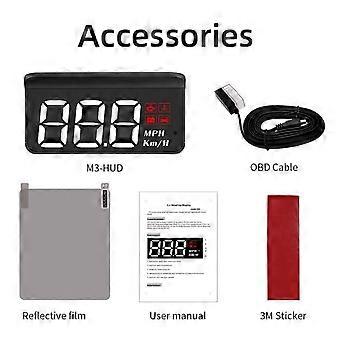
M3 Buttons and functions are described
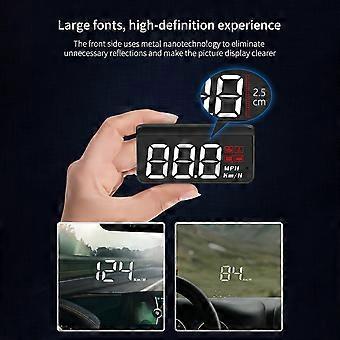
1.Multifunction: Speed, Water temperature, Voltage
2.Short Press-To switch voltage, water temperature,vehicle speed,enter into menusetting to switch menu options or parameter values
Long Press-To enter into menu settings (see instructions for Menu 1-12) and press 5 seconds to save and exit
3.Short Press-Menu - and parameter value
Long Press-To turnon andoff the buzzer(default choice is buzzer on,you can freely choose to turn on or off)
4.Engine icon, Water temperature icon
5.Voltage icon, Fatigue driving icon
6.Speed unit: MPH- mile 7.KM/H- kilometer 8.OBD connection port 9.Short Press-Menu + andparametersvalue + LongPress-Long press till the screen is all on, and the fault code is eliminated, long press again to exit
10.Power switch-Long press for 5sto turn off,again to turn on EASY INSTALLATION Easy to install plug and play
Multi-function switch
Vehicle speed water temperature voltage single mileage 5 alarm functions 1.Overspeed alarm 2.water temperature alarm 3.fatigue driving reminder 4.voltage alarm
3 it will automatically alarmif overspeed so it can save youfrom looking down the speedometer and drive safely.
-
品牌:
Unbranded
-
类别:
船舶
-
颜色:
OBD2
-
Fruugo ID:
200058349-425907262
-
EAN:
970907631174
产品安全信息
请参阅下面列出的特定于该产品的产品安全信息
以下信息由销售该产品的独立第三方零售商提供。
产品安全标签

安全警告:
important Safety Instructions Read Before Use: Please read all instructions and safety warnings before using this product. Failure to follow these guidelines may result in injury, damage, or malfunction. General Warnings Intended Use: Use this product only for its intended purpose as described in the user manual. Supervision Required: This product is not intended for use by children or persons with reduced physical, sensory, or mental capabilities without supervision. Inspection Before Use: Check for any signs of damage or wear before use. Do not use if damaged. Usage Precautions Environment: Do not use in wet, damp, or flammable environments unless specified as safe for such conditions. Proper Operation: Follow all operating instructions carefully. Avoid improper handling or misuse. Power Source: Use only the recommended power supply or batteries. Do not exceed specified voltage or current ratings. Maintenance and Care Cleaning: Disconnect from power before cleaning. Use only manufacturer-recommended cleaning methods and solutions. Storage: Store in a cool, dry place away from direct sunlight and extreme temperatures. Repairs: Do not attempt to disassemble or repair the product. Contact authorized service personnel for assistance. Specific Warnings Avoid Hazards: Keep the product away from sharp objects, water, and heat sources. In Case of Malfunction: If the product malfunctions or exhibits unusual behavior, discontinue use immediately and contact customer support. Disposal Instructions Recycling: Dispose of the product in accordance with local electronic waste disposal and recycling guidelines. Battery Disposal: Follow specific regulations for the safe disposal of batteries if included.